
A contractor hears two completely different stories about the same website.
A past client says, “Your site looks great.” The estimator says, “Half these quote requests are outside our area, too small for our crew or impossible to reach.”
Both can be right.
A polished website can make a good first impression and still leak qualified projects between the landing page, the form, the inbox and the first call. Sending it more visitors will not repair that path. It may simply create more follow-up work for the same number of jobs.
Here is the short answer: a contractor website is ready for more traffic when it attracts the right service-and-location fit, proves relevant capability, collects enough information to assess the project, routes the enquiry to an accountable person and records what happened after the form was submitted.
This contractor website checklist turns that journey into 15 checks. Use it before approving a redesign, increasing an SEO budget or raising Google Ads spend.
Key takeaways#
- A form submission is an enquiry, not automatically a qualified lead.
- Check the full path from visitor to won job; do not judge the website from traffic and form counts alone.
- Fix the first weak gate. More traffic rarely compensates for unclear services, poor proof, broken routing or missing sales feedback.
- There is no universal ideal number of form fields. Ask only for information your team needs to judge fit and take the next step.
- Use the score as a planning tool, not as a Google metric or a promise of rankings, leads or revenue.
Define the outcome before you score the website#
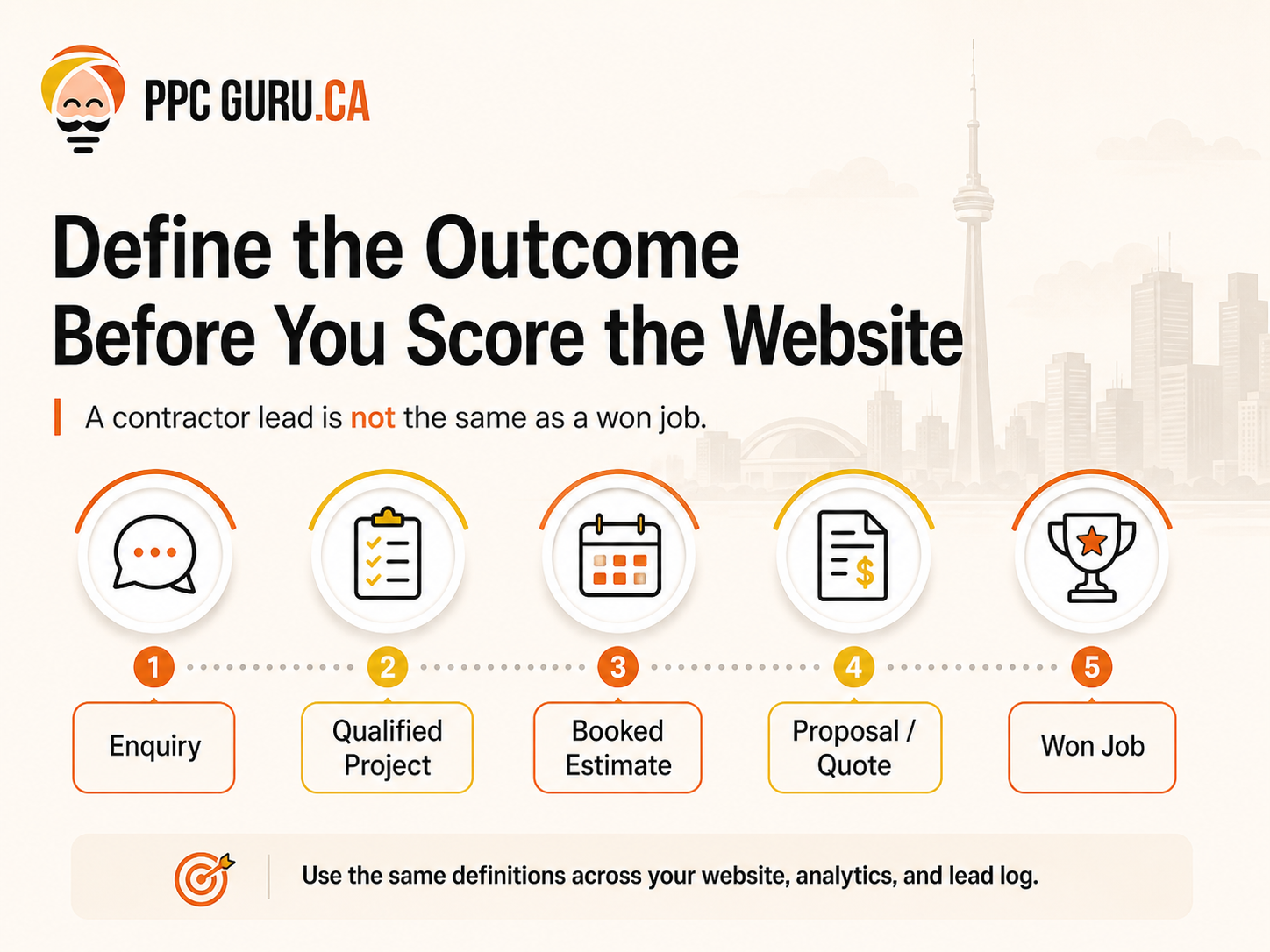
“Lead” is a slippery word. Marketing may count every submitted form. Sales may count only prospects worth calling. An estimator may reserve the term for projects that fit the service area, scope and schedule.
Agree on the stages first:
| Stage | Practical definition |
|---|---|
| Enquiry | A person called, submitted a form or used another tracked contact method. Fit has not been confirmed. |
| Qualified project | The service, location, approximate scope and timing fit the work the company is prepared to assess. |
| Booked estimate or site visit | The prospect and contractor agreed to a defined next step. |
| Proposal or quote | The company decided the opportunity was suitable enough to price. |
| Won job | The customer accepted and the job entered the company’s normal booking or contract process. |
Your definitions may differ. That is fine. What matters is that the website, analytics and lead log use the same language. Otherwise, a campaign can appear successful while the estimating team quietly rejects most of its enquiries.
Set these definitions beside the contractor website checklist so every reviewer scores the same business outcome.
How the 30-point score works#
The Qualified Project Lead Path has five gates and three checks per gate. Score each check:
- 0: absent, broken or unsupported;
- 1: present but incomplete, generic or inconsistently used;
- 2: clear, tested and connected to the next stage.
The maximum is 30. This is PPC Guru’s editorial framework—not a Google score, ranking factor or guarantee.
Do not average away a serious failure. If the website scores well overall but form notifications reach an abandoned inbox, fix delivery before buying another click.
Contractor website checklist gate 1: Does the page attract the right project?#
1. Can a visitor identify the service in a few seconds?#
“Quality construction solutions” does not tell a homeowner whether you finish basements, replace roofs or manage commercial fit-outs. Name the work in language a customer uses and clarify the projects you are equipped to take.
Check the page title, main heading, opening copy, navigation label and primary call to action. They should point to the same service. A visitor should not have to decode an internal trade term to understand the offer.
Score 2 when the page clearly owns one service decision and guides the reader to relevant proof and next steps. Score 1 when the service appears but shares the page with a long list of unrelated work. Score 0 when the offer is vague or mismatched.
2. Is the service area accurate and useful?#
“Serving the GTA” can be true and still be unhelpful. A prospect wants to know whether the crew will take this kind of project in this location.
State the real operating area and important limitations. Link to useful location information only where the business has genuine coverage and enough distinct information to help the reader. Do not create a city page merely by changing Toronto to Mississauga throughout a template.
Score 2 when the area claim reflects operations and helps a visitor judge fit. Score 1 for broad but truthful coverage. Score 0 for missing, conflicting or inflated location claims.
3. Does the landing page match the traffic promise?#
A Google Ads visitor who searched for basement renovation should not land on a generic construction homepage. An organic visitor reading about an addition should not be pushed directly into a form for “all contracting services.”
Google Ads recommends aligning the landing page with the ad, keywords and call to action. That is also sensible for non-paid visitors: continue the conversation that brought the person to the page.
Score 2 when the source, message, page and next action agree. Score 1 when the right information exists but requires hunting. Score 0 when the visitor lands in a different conversation.
Contractor website checklist gate 2: Does the website prove relevant capability?#
4. Are real projects shown with useful context?#
A gallery of polished rooms proves that someone took photographs. It does not necessarily show what your team was responsible for.
For selected projects, explain the type of property, scope, constraints, decisions and work performed. Use original, approved images. If a project is illustrative rather than yours, label it. Never invent an address, customer quote, budget, permit outcome or completion time.
Score 2 for relevant, supportable project evidence that helps a prospect compare their job. Score 1 for authentic images with limited context. Score 0 for stock-heavy, unverifiable or misleading proof.
5. Can a visitor verify the business details that matter?#
Trust is built from consistency more than decoration. Confirm the business name, contact details, team identity and any licence, insurance, warranty, association or certification statement before publishing it. Requirements vary by trade and project, so avoid universal claims unless a qualified reviewer has checked them.
Reviews can support a decision when they are genuine, current and shown with permission or through an appropriate platform integration. A perfect-looking testimonial with no source may raise more questions than it answers.
Score 2 when important details are specific and supportable. Score 1 when the basics are present but scattered. Score 0 when claims conflict or cannot be verified.
6. Does the page answer the questions that delay a quote request?#
Strong pages reduce uncertainty without pretending every job is identical. Depending on the trade, readers may need to understand:
- the projects the company accepts;
- what happens during an initial assessment;
- whether design, permits or specialist trades are part of the scope;
- what the customer should prepare;
- how estimates are developed;
- typical scheduling factors; and
- what happens after an enquiry.
Only publish timelines, price ranges or process commitments the business has approved. “It depends” is not useful by itself; explain what it depends on.
Score 2 when the page resolves the main buying questions honestly. Score 1 when answers exist but are generic. Score 0 when the next step feels like a black box.
Contractor website checklist gate 3: Does the site qualify without creating needless friction?#
7. Does the enquiry path collect information the team actually uses?#
There is no universal perfect form length. A one-field form may create volume and leave the estimator blind. A 20-field form may demand details a homeowner does not yet know.
Ask for the minimum information needed for the next decision. For a GTA renovation company, that might include contact details, project type, postal code, approximate timing and a short description. A commercial contractor may need different inputs.
Score 2 when every required field has a clear operational purpose. Score 1 when the form works but asks too much or too little. Score 0 when the submission cannot be used to assess or route the project.
8. Is the company’s pricing posture clear enough to prevent obvious mismatches?#
This does not require publishing a fixed price. The business may choose to explain how quotes are built, the projects it does not accept, an approved starting scope or a genuine project minimum. The right choice depends on margins, sales process and competitive context.
Do not copy a competitor’s minimum or let an agency invent one. The purpose is to reduce avoidable mismatches while preserving a useful conversation with suitable prospects.
Score 2 when approved guidance helps a visitor self-assess. Score 1 when fit is discussed indirectly. Score 0 when the page invites every possible project and leaves qualification entirely to the callback.
9. Is the form respectful, accessible and paired with another contact route?#
Collect only information required for the stated purpose. Explain what happens after submission. Avoid asking for unnecessary sensitive details in a first-contact form, and make sure validation messages can be understood on a phone.
Some people would rather call. Others cannot take a call during the day. Offer a realistic alternative, but do not display a phone number nobody owns.
Score 2 when the form is easy to complete, privacy-conscious and supported by a working alternative. Score 1 when it functions but creates uncertainty. Score 0 when it fails, over-collects or traps the visitor.
Contractor website checklist gate 4: Does the enquiry reach someone who can act?#
10. Can a mobile visitor take the next step comfortably?#
Google recommends an overall page experience that works well on mobile, uses secure delivery and avoids intrusive interruptions. Good page-experience scores do not guarantee rankings, but poor usability can still lose the person already on the page.
Test the service page on a real phone. Can someone read the proof, open project images, tap the phone number, complete the form and understand the confirmation without zooming or dismissing repeated pop-ups?
Score 2 after testing the complete action path on common devices. Score 1 when it works with friction. Score 0 when an important action is hidden or broken.
11. Have form delivery and notifications been tested end to end?#
A successful on-screen message does not prove that an enquiry reached the team. Submit test leads from desktop and mobile. Confirm the database or form system captured them, the correct inbox or CRM received them and any acknowledgement went to the visitor.
Repeat this after plugin updates, CRM changes, domain migrations or spam-filter adjustments. Use test details clearly marked as tests so they do not contaminate sales reporting.
Score 2 when the full chain is tested and documented. Score 1 when notifications usually arrive but no one owns routine testing. Score 0 when delivery is unknown or unreliable.
12. Is there a named response owner and a fallback?#
“The office handles it” is not a routing rule. Decide who receives each enquiry, what information they need, when it should be reviewed and who takes over when that person is away.
The right response target depends on the business and should be approved by operations. Do not publish an aggressive callback promise that the team cannot consistently meet.
Score 2 when ownership, handoff and fallback are clear. Score 1 when one person informally watches the inbox. Score 0 when suitable projects can sit untouched without anyone noticing.
Contractor website checklist gate 5: Can you connect traffic to a business outcome?#
13. Are calls and forms recorded as enquiries—not celebrated as sales?#
Set up analytics so the team can see meaningful contact actions. Google Analytics 4 includes a recommended generate_lead event for a form submission or request for information. That is the beginning of the sales path, not its conclusion.
Check for duplicate events, internal tests and spam. If call tracking is used, document how numbers behave and make sure business details remain accurate for visitors.
Score 2 when important enquiry actions are recorded and quality checks exist. Score 1 when some actions are counted. Score 0 when reporting relies on clicks to a button or an untested thank-you page.
14. Does the lead log record qualification decisions?#
GA4 also recommends events such as qualify_lead, disqualify_lead and working_lead. Whether these are implemented in analytics or mirrored in a CRM, the business needs a way to distinguish project fit from raw contact volume.
Useful fields may include service, area, project type, fit reason, assigned owner and stage. Keep the system simple enough that the team will use it.
Score 2 when the business can explain why enquiries qualify or fail. Score 1 when decisions live in email or memory. Score 0 when every form is reported as equal.
15. Can quoted and won work be traced back to its source?#
The final check closes the loop. Record when a project becomes a booked assessment, proposal and won or lost job. Google’s recommended lead-generation events include closed outcomes, but a practical CRM or lead log can also provide this view.
The goal is not perfect attribution. A referral may search the brand before calling, and a homeowner may visit several times. Use the evidence to compare patterns and make better budget decisions, not to claim certainty the data cannot support.
Score 2 when marketing and sales can review outcomes together. Score 1 when only some jobs retain source context. Score 0 when nobody can connect spend or content to suitable opportunities.
Contractor website checklist scorecard#
| Gate | Checks | Score |
|---|---|---|
| Attract the right project | Service clarity; service-area clarity; traffic/page match | /6 |
| Prove relevant capability | Project evidence; verified trust; buying answers | /6 |
| Qualify appropriately | Useful fields; pricing posture; respectful form and alternatives | /6 |
| Route and respond | Mobile action path; delivery testing; response ownership | /6 |
| Measure the outcome | Enquiry tracking; qualification stages; quoted/won feedback | /6 |
| Total | 15 checks | /30 |
Use the result as a triage guide:
- 24–30: structurally ready for controlled traffic growth; continue testing.
- 17–23: repair the first weak gate before materially increasing spend.
- 9–16: rebuild the priority path and tracking before scaling acquisition.
- 0–8: diagnose the fundamentals; more traffic is unlikely to be the first fix.
This contractor website checklist is deliberately stricter than a visual review. A beautiful 25-point site with broken form delivery still has an urgent problem.
The path changes slightly by traffic source#
| Visitor source | What the visitor may already know | What the page must do particularly well |
|---|---|---|
| Referral | Someone recommended the company | Confirm identity, capability, fit and an easy next step |
| Organic search | The visitor has a problem or service in mind | Match service intent, answer the decision questions and show relevant proof |
| Google Ads | The ad made a specific promise | Preserve message match, make the action clear and measure downstream quality |
| Google Business Profile or direct | The visitor may be comparing local options or returning | Keep contact, hours, area and business details consistent; route them to the right service |
The same homepage does not need to carry every conversation. Clear website design and development for contractors can give priority services their own path, while Google Ads management and SEO services send traffic to the most relevant destination.
Use the contractor website checklist separately for each important source-to-page path; one strong referral journey does not prove that a paid-search journey works.
An illustrative GTA renovation example#
Imagine a renovation company that focuses on basements, kitchens and additions in Toronto, Mississauga and Vaughan. The example is fictional; it is not a PPC Guru client result.
The website receives forms, but the estimator sees projects outside the service area and small handyman requests the company does not handle. The owner is considering more Google Ads spend.
The team applies the scorecard and finds four problems:
- a generic homepage receives traffic for three distinct services;
- gallery images lack project type and scope;
- the form asks for a message but not a project type or postal code; and
- completed forms reach one person with no fallback or consistent lead stage.
They do not begin by adding traffic. They create clearer service paths, annotate approved project examples, add project type, postal code and timing questions, test notifications and introduce a simple lead log. Google Ads can then use the relevant service page, and SEO content can link to a clear commercial owner.
No result is assumed. The point is that the next marketing decision will be based on project-fit and sales-stage evidence rather than form volume alone.
Should you patch, rebuild or increase traffic?#
| Decision | Choose it when | First action |
|---|---|---|
| Patch the current path | Services and site structure are sound, but one or two gates leak | Repair the specific page, form, routing or tracking issue; retest |
| Rebuild the priority path | The site is a generic catch-all, mobile actions fail, ownership is unclear or measurement stops at the form | Map one high-value visitor-to-project journey before redesigning the whole site |
| Increase traffic carefully | The path scores well, the team has response capacity and lead stages are measurable | Run a controlled SEO or paid-search test and review qualified outcomes |
For construction and renovation firms, a focused contractor website solution should support the way projects are actually assessed—not force operations into a generic marketing template. Broader construction and renovation marketing should use the same definitions of service, area and qualified project.
A seven-day contractor website audit#
This contractor website checklist can be completed in a week when marketing, estimating and operations each own the checks they can verify.
Day 1: choose one service path#
Pick one priority service and one genuine target area. Record the main traffic sources and the page each source currently reaches.
Day 2: review the promise#
Compare search query or ad, page title, heading, proof and call to action. Note where the conversation changes.
Day 3: verify every claim#
Ask operations to confirm areas, services, project evidence, credentials, process and any pricing language. Remove or qualify unsupported statements.
Day 4: test the enquiry path#
Use a phone and desktop. Submit clearly marked test enquiries, try the call path and inspect error and confirmation messages.
Day 5: follow the handoff#
Confirm where each enquiry appears, who owns it, which details are visible and what happens when the primary person is unavailable.
Day 6: reconcile analytics and the lead log#
Check whether tests generated the expected events. Add practical qualification and outcome stages without collecting unnecessary data.
Day 7: score and prioritize#
Complete the contractor website checklist with marketing, estimating and operations. Fix the first broken gate, assign an owner and set a retest date.
Frequently asked questions#
What should every contractor website include?#
At minimum, it should explain the services and real service area, show supportable proof, answer major buying questions, provide a usable contact path, route enquiries reliably and record what happened. The exact pages and fields depend on the trade and sales process.
How many fields should a contractor quote form have?#
There is no universal number. Ask for the minimum information needed to decide and route the next step. If the project requires more detail, a two-step process may be easier than placing every question on the first screen.
Should a contractor display prices on the website?#
Only when the pricing posture is accurate, approved and useful. Options include explaining quote factors, a genuine project minimum or an approved starting scope. Do not publish a made-up range simply to discourage poor-fit leads.
Does a faster contractor website rank higher?#
Speed and mobile usability contribute to page experience, but perfect technical scores do not guarantee rankings. Treat performance as part of a useful, accessible visitor experience and one component of broader SEO—not a shortcut.
Should Google Ads traffic go to the homepage?#
Usually the best destination is the page that continues the ad’s specific service and location promise. A homepage can work for a branded or broad conversation, but a generic page often forces the visitor to start over.
What is the difference between an enquiry and a qualified project lead?#
An enquiry is a tracked contact. A qualified project fits the company’s agreed service, area, scope and operational criteria well enough to pursue. Writing this definition down prevents raw form volume from being mistaken for sales value.
How often should the website path be tested?#
Test after meaningful form, CRM, plugin, analytics, domain or design changes, and on a recurring schedule appropriate to lead volume and risk. The owner should document who tests, what counts as success and where failures are recorded.
Before you buy more traffic#
A website cannot select the right projects if nobody has defined “right.” It cannot prove work the company has not documented. It cannot repair an inbox no one owns, and a dashboard cannot reveal won jobs if sales outcomes never return to it.
Start with one service, one area and one path. Score it with the people who sell and deliver the work. Then decide whether the next dollar belongs in a page repair, a larger rebuild, SEO or paid acquisition.
If you want a second set of eyes, request a contractor website and qualified-lead-path audit. PPC Guru can review the path from landing page to lead handoff and help identify what should be verified, repaired and measured before you scale traffic.