
A WordPress website not ranking on Google usually has one of three problems: Google cannot index the right page, the page does not deserve to rank for the intended search, or it ranks but fails to turn visitors into enquiries. PPC Guru's SEO services for Toronto businesses address all three—but you can use the checks below to identify the bottleneck before paying for more content, links or traffic.
The important word is identify. Installing another SEO plugin, rewriting every title or requesting indexing repeatedly will not solve a problem you have not diagnosed.
Contents#
- The short answer
- The 12 diagnostic checks
- Priority scorecard
- Common WordPress ranking questions
- AI search implications
- When to hire a specialist
The short answer: why is my WordPress website not ranking on Google?#
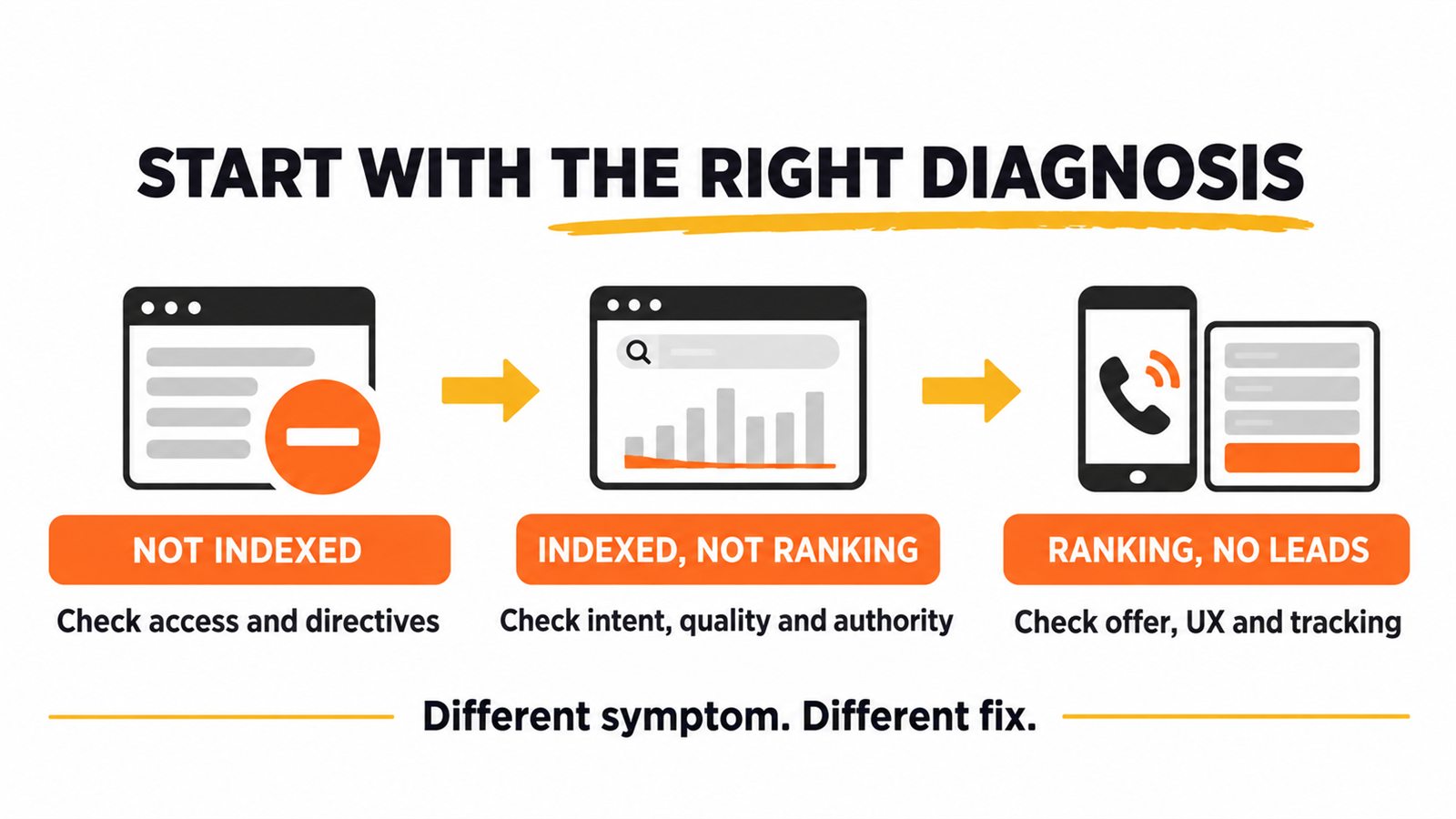
Your WordPress site may not rank because an important page is blocked, marked noindex, redirected, canonicalized elsewhere, poorly linked or absent from the XML sitemap. If Google has indexed it, the issue is more likely weak intent alignment, thin or repetitive content, insufficient local relevance, limited authority, or stronger competing pages. And if the page already receives qualified impressions, the real problem may be its title, offer, user experience or tracking—not SEO visibility.
Use Google Search Console to place the page in the correct bucket first:
| What you see | What it usually means | Start here |
|---|---|---|
| URL is not indexed | Access, directive, canonical, discovery or quality issue | Checks 1–6 |
| URL is indexed but has few relevant impressions | Intent, content, local relevance or authority issue | Checks 7–11 |
| URL gets impressions/clicks but few enquiries | Search snippet, offer, UX or measurement issue | Check 12 |
Google makes an important distinction here: a URL being eligible for Search does not guarantee that it will appear for a particular query. Its inspection-tool help separates index eligibility from actual visibility.
Before the 12 checks: choose one page and one query#
Do not audit “the website” as one object. A WordPress website not ranking on Google needs to be reduced to one commercially useful page and the search it should satisfy.
For example:
- Page: a physiotherapy clinic's pelvic-floor treatment page
- Query: “pelvic floor physiotherapy Toronto”
- Desired action: book an assessment
That is testable. “We want more traffic” is not.
Record the page URL, target query, intended visitor, primary conversion and current Search Console data. Then work through these checks in order.
1. Confirm whether the page is absent, indexed or simply ranking low#
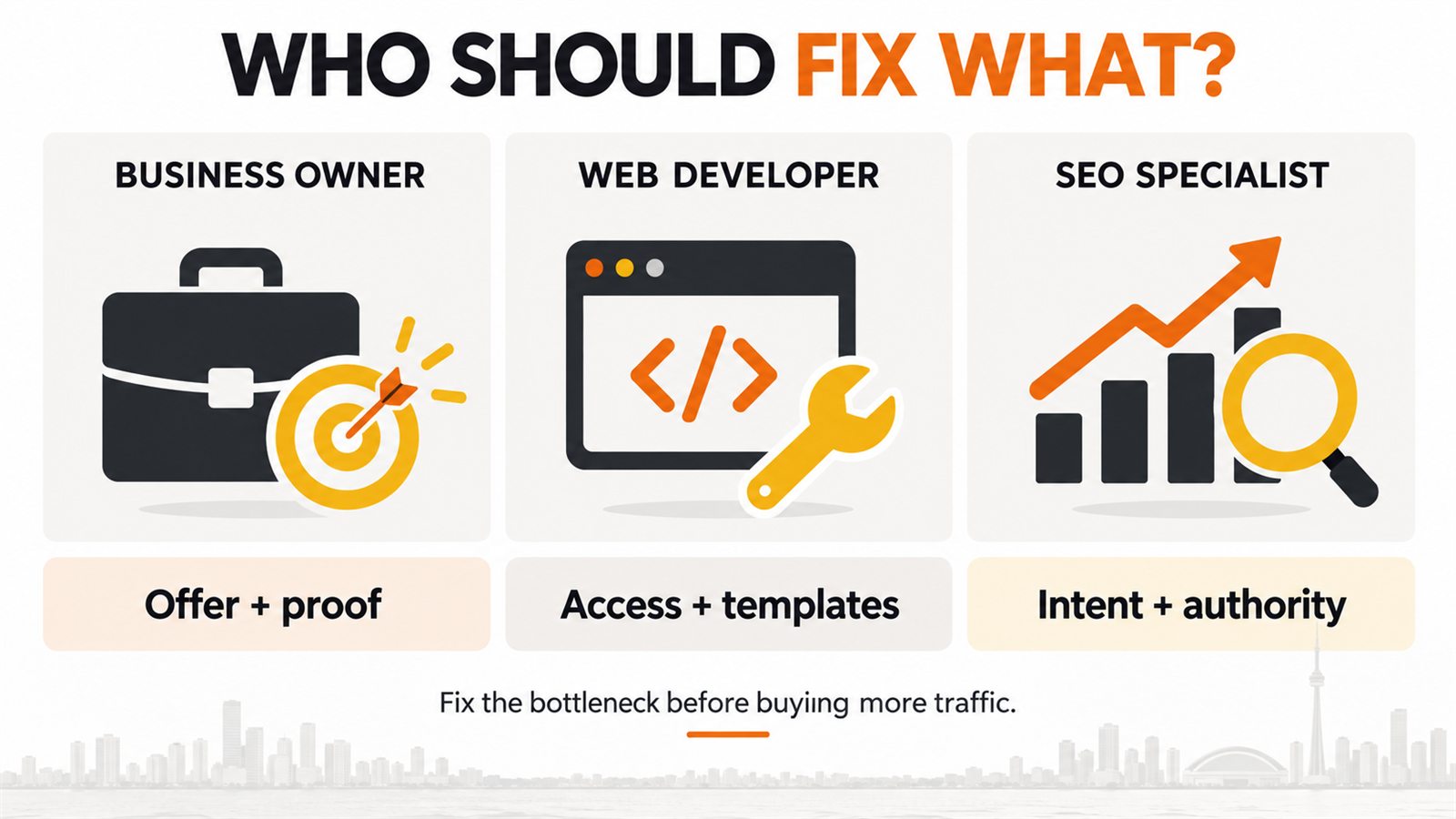
Owner: Business owner or SEO specialist
Time: 10 minutes
Open Search Console, paste the full URL into URL Inspection, and review both the indexed result and Test live URL.
Look for:
- “URL is on Google” or a specific exclusion reason
- the last crawl date and crawl response
- whether indexing is allowed
- the user-declared and Google-selected canonical URLs
- the referring sitemap
The indexed report is Google's stored view; the live test checks the current page. A live test can pass while the indexed report still shows an older problem. Google also notes that the live test cannot predict every indexing decision, including canonical selection.
Fix: Save the evidence before changing anything. If the URL is indexed, stop treating it as a crawling problem and move to intent and quality checks.
2. Check WordPress's Search Engine Visibility setting#
Owner: Business owner or web developer
Time: 2 minutes
In WordPress, go to Settings → Reading and find Search Engine Visibility. The “Discourage search engines from indexing this site” box should normally be unchecked on a live business website.
This setting is easy to leave enabled after a redesign or staging migration. WordPress's official Reading Settings documentation explains that the setting can output a noindex,nofollow robots directive.
Fix: Uncheck it only if the public site should be searchable. Then clear relevant caches and retest the live URL. Do not change this setting on a private staging site.
3. Inspect robots directives—not just robots.txt#
Owner: Web developer or SEO specialist
Time: 10–20 minutes
Three controls are commonly confused:
robots.txtmanages crawling.- a robots meta tag can request
noindex. - an
X-Robots-TagHTTP header can also requestnoindex.
A plugin, maintenance tool, CDN rule or server configuration can add a directive without it being obvious in the WordPress editor.
Fix: Check the rendered HTML and HTTP headers. If an important page contains noindex, identify the source before removing it. Google advises against using robots.txt as the mechanism for keeping a page out of its index; see its technical SEO guidance.
4. Confirm the status code, redirects and final URL#
Owner: Web developer
Time: 10 minutes
An indexable page should normally return a clean 200 response at the preferred URL. Watch for:
- redirect chains after HTTP-to-HTTPS or domain migrations
- old slugs that redirect twice
- soft 404s on thin location or service pages
- server errors that appear only to bots or uncached visitors
- mixed versions with and without
wwwor trailing slashes
Fix: Link directly to the final canonical URL, shorten redirect chains and resolve intermittent server errors. If a page was intentionally removed and has no replacement, a real 404 or 410 is more honest than redirecting every missing URL to the homepage.
5. Compare the declared canonical with Google's choice#
Owner: SEO specialist and web developer
Time: 15 minutes
A canonical tells search engines which URL you prefer when several pages are duplicates or near-duplicates. WordPress sites can create variations through tags, categories, archives, pagination, parameters, print views and plugin-generated URLs.
In URL Inspection, compare:
- User-declared canonical
- Google-selected canonical
If your service page points to another URL—or Google selects another page—the intended page may not be the version evaluated for ranking.
Fix: Use a self-referencing canonical on the preferred page, link internally to that version, include it in the sitemap and redirect true duplicates where appropriate. Google's canonicalization guide emphasizes that canonical signals are considered together and Google may still choose a different representative URL.
6. Make the page easy to discover through links and the sitemap#
Owner: SEO specialist
Time: 20 minutes
An XML sitemap can help discovery, but it neither guarantees indexing nor improves ranking by itself. Google says a sitemap is a signal about which canonical URLs matter; it is not a substitute for site navigation.
Check whether the page:
- appears in the current XML sitemap
- is linked from the main navigation, a relevant service hub or related articles
- sits within a logical click path from the homepage
- receives descriptive internal anchors rather than repeated “learn more” links
- is accidentally orphaned after a menu or URL change
Fix: Add links where they help a visitor continue. For this article, for example, an early link to PPC Guru's SEO and local-search service explains the commercial next step, while links to the Toronto SEO cost guide and monthly SEO checklist answer adjacent questions without making this page compete with them.
7. Remove low-value duplication created by themes and plugins#
Owner: SEO specialist and web developer
Time: Varies
WordPress is not “bad for SEO,” but it makes publishing easy—and that can produce many URLs with very little unique value. Common examples include empty tag archives, date archives, attachment pages, filtered URLs and near-identical city pages.
Google's Page Indexing report explicitly says that not every known URL should be indexed. A healthy site is not one with 100% index coverage; it is one where the important canonical pages are indexed and low-value variations are handled deliberately.
Fix: Decide whether each URL type should be improved, consolidated, redirected, canonicalized or excluded. Do not mass-delete URLs based only on an “Excluded” count. Validate representative samples first.
8. Match the page type to the searcher's intent#
Owner: SEO specialist and content editor
Time: 30–60 minutes
If someone searches “emergency plumber Toronto,” they usually need a service page—not a 2,500-word history of plumbing. A WordPress website not ranking on Google for its intended query may simply be offering the wrong page type: a sales page where people need a guide, or a guide where they need a local service.
Review the current results for the target query and note:
- dominant page type: service page, guide, category, tool or local result
- recurring questions and decision criteria
- depth needed to solve the problem
- what useful information competitors omit
Fix: Rebuild the page around the job the searcher is trying to complete. Keep one primary intent per page. That reduces cannibalization between a service page and its supporting content cluster.
9. Make service and location pages genuinely local#
Owner: Business owner and SEO specialist
Time: 1–3 hours per core page
Adding “Toronto” to a title is not a local strategy. A strong local page helps someone decide whether the business can solve their problem in their area.
Useful local evidence can include:
- the specific services available in Toronto or the GTA
- neighbourhoods or municipalities actually served
- real photos, staff, credentials and customer proof
- local regulations, seasonality or service constraints where relevant
- a consistent business name, address or service area, phone and hours
- a clear connection to the Google Business Profile
Avoid cloning one page for Toronto, Mississauga, Brampton and Vaughan while swapping only the city name. Consolidate overlapping pages when you cannot make each one meaningfully useful.
10. Improve the content's information gain#
Owner: Business owner and content editor
Time: 2–4 hours
An SEO plugin can tell you whether a phrase appears in a title. It cannot supply experience, evidence or a better solution.
Ask what your page contributes that a searcher cannot get from ten generic articles. Good additions include:
- a diagnostic decision tree
- a downloadable checklist or worksheet
- original examples from the business's workflow
- screenshots with dates and explanations
- clear “do this yourself / ask a developer / hire an SEO” ownership
- limitations and cases where the recommendation does not apply
This guide, for instance, separates three different symptoms and assigns each check to the person best equipped to fix it. That is more useful than another unordered list of SEO tips.
11. Strengthen topical authority and external corroboration#
Owner: SEO specialist
Time: Ongoing
A single page rarely proves expertise on a competitive commercial topic. Build a cluster in which each page owns a distinct question and links naturally to the central service.
For a WordPress SEO cluster, that may include:
- this diagnostic guide for “site not ranking” intent
- a technical guide to indexing and crawl controls
- a local landing-page guide for Toronto businesses
- a measurement guide connecting organic visibility to qualified leads
- a commercial SEO service page for visitors ready to hire
Support factual claims with first-party or authoritative sources. Earn relevant links through useful tools, research, partnerships and expert contributions—not bulk directory submissions or paid link schemes.
Fix: Map one primary query and conversion goal to every page. If two URLs serve the same intent, improve the stronger one and consolidate where appropriate.
12. Check the search snippet, page experience and lead path#
Owner: Business owner, web developer and SEO specialist
Time: 30–60 minutes
Rankings are not the finish line. A page can appear in Search and still produce no business.
Review:
- whether the title clearly promises the right answer
- whether the description sets a truthful expectation
- mobile layout, speed and intrusive overlays
- a visible phone, form or booking action
- proof near the decision point
- GA4 events for calls, forms and bookings
- Search Console clicks and impressions by query and page
Google generates title links automatically from several page and link signals, so keep the title element, visible heading and internal anchors consistent. Its title-link guidance also recommends one clear, descriptive main title rather than boilerplate or keyword stuffing.
Fix: Measure qualified actions, not just sessions. If clicks rise but enquiries do not, improve the offer and conversion path before producing more traffic. PPC Guru can also review the site's conversion-focused website design when the bottleneck sits beyond rankings.
A practical priority scorecard#
Score each item red, amber or green. Fix red items from top to bottom because later improvements cannot compensate for a page Google cannot access or understand.
| Check | Red | Amber | Green | Primary owner |
|---|---|---|---|---|
| Index state | Important URL excluded | Indexed inconsistently | Indexed as intended | SEO |
| WordPress visibility | Discourage setting on | Recently changed | Off on live site | Developer |
| Robots directives | Important page noindexed | Rules unclear | Deliberate and tested | Developer |
| Status/redirects | Error or loop | Multi-hop redirect | Clean 200 at final URL | Developer |
| Canonical | Points elsewhere incorrectly | Signals conflict | Self-canonical preferred URL | SEO + developer |
| Discovery | Orphaned | Weak links | Sitemap + contextual links | SEO |
| URL duplication | Many low-value variants | Partial controls | Intentional index set | SEO + developer |
| Search intent | Wrong page type | Partial match | Direct task match | SEO + editor |
| Local usefulness | City-name swap | Some local proof | Distinct local value | Owner + SEO |
| Information gain | Generic summary | Useful but replaceable | Original utility/evidence | Owner + editor |
| Authority | Isolated page | Thin cluster | Clear cluster + credible citations | SEO |
| Lead path | Untracked or broken | Friction remains | Qualified actions measured | All |
What does “Crawled—currently not indexed” mean?#
It means Google fetched the URL but did not add it to the index at the time represented by the report. It is not automatically a technical error. Check whether the page is a duplicate, thin, outdated, low-value or still being processed. Inspect the individual URL, compare Google's canonical choice and improve the page only when it deserves to exist as a distinct search result.
Repeatedly clicking Request indexing does not create quality or uniqueness.
Is an SEO plugin enough to rank a WordPress website?#
No. An SEO plugin can help manage titles, descriptions, canonicals, sitemaps and structured data. It cannot guarantee indexing or rankings, determine whether your offer matches search intent, create local proof, earn authority, or fix a poor conversion experience.
Use the plugin as a control panel, not as the strategy.
How long does a WordPress website take to rank?#
There is no reliable universal timeline. A technically sound page on an established site targeting a specific low-competition query may move sooner than a new domain pursuing “SEO agency Toronto.” Crawling, indexing, competition, content usefulness, authority and site history all matter. Google says it cannot guarantee when—or whether—a URL will be crawled and indexed.
Judge progress in stages:
- Can search engines access the preferred URL?
- Is it indexed and receiving relevant impressions?
- Are average position and clicks improving for the intended query set?
- Are those visits producing qualified calls, forms or bookings?
For budgeting context, read how much SEO costs in Toronto. For deliverables and accountability, use the monthly SEO services checklist.
Will these fixes help with AI search and answer engines?#
They improve eligibility and clarity; they do not guarantee a citation. Google says its generative AI features use the core Search index and ranking systems, so established SEO fundamentals remain the base. Bing similarly states that discovery, indexing accuracy, clear structure and authority support both search visibility and grounding in AI experiences.
For this page, the AEO/GEO work is practical:
- answer the main question immediately
- use question-led headings and self-contained answers
- define terms before giving tactics
- cite primary sources for technical claims
- provide a table and decision framework that can be extracted accurately
- keep the PPC Guru entity, service and location details consistent
- include a visible review date and update material changes
There is no special schema or keyword-density formula that guarantees a mention in ChatGPT, Gemini, Claude, Perplexity, Google AI Overviews or Copilot.
When should you hire a WordPress SEO specialist?#
Bring in help when a WordPress website not ranking on Google has conflicting canonical or indexing signals, a migration caused widespread losses, several plugins control the same metadata, important pages compete with one another, or traffic cannot be connected to qualified leads.
A useful specialist should be able to show:
- which URLs and queries were inspected
- what evidence supports the diagnosis
- which fixes belong to content, development or business operations
- what will be measured after implementation
- what is uncertain and what cannot be guaranteed
If you want a second set of eyes on a WordPress website not ranking on Google, run PPC Guru's free instant website audit or request a hands-on SEO review. We will identify the highest-impact bottleneck first—whether it sits in WordPress, search intent, local relevance or the lead path.
Sources and review note#
This guide was reviewed on September 8, 2026. Technical recommendations were checked against Google's inspection guide, Google's indexing guide, Google's canonicalization guidance, Google's generative AI optimization guide, Bing Webmaster Guidelines and WordPress's Reading Settings documentation. Platform behaviour can change; verify critical findings in the current tools before implementing them.